DHSBC STM32MP13: Difference between revisions
From Wiki-DB
Jump to navigationJump to search
Ageisreiter (talk | contribs) |
Ageisreiter (talk | contribs) |
||
| Line 159: | Line 159: | ||
|} | |} | ||
* [https://joy-it.net/en/products/RB-TFT3.2V2 Link: joy-it RB-TFT3.2V2] | * [https://joy-it.net/en/products/RB-TFT3.2V2 Link: joy-it RB-TFT3.2V2] | ||
==== Year 2038 problem with 32-bit systems ==== | |||
:'''How can the problem be solved?''' | |||
:- Linux kernel - disable COMPAT_32BIT_TIME and fix whatever broken userspace you might still have. This disables backward compatibility syscalls which use 32bit time_t and which will surely break in 2038. | |||
:- Userspace/OE - Keep an eye on OE QA failures flagged with "32bit-time" which indicate use of 32 bit time_t . Fix your recipes and upstream the changes. | |||
:- Filesystems - Avoid ext2 and ext3, they are always affected by Y2038. Avoid ext4 with small inode size, less than 256 Bytes inodes are affected. Use ext4 with inodes larger than 256 Bytes. | |||
:- Testing - See OE-core meta/conf/distro/include/time64.inc as a good starting point for simulating Y2038 in QEMU. Test real HW as well, set time past 2038 and especially test updates, see if TLS certificates survive or there is a roll-over of some sort, which would break update-ability in field after 2038. Note that wrong system time, set in far past, can also make the SSL library reject certificates. | |||
== Links == | == Links == | ||
Revision as of 12:05, 15 September 2025
The DHSBC STM32MP13x board is the official DHCOR STM32MP13 reference design!

|
Introduction
Reference design for secure industrial IoT devices based on STM32MP13x
- Single Board Computer based on the solderable DHCOR STM32MP13
- Compatible with accessories from the Raspberry Pi© community
- Highlights: Bluetooth / WiFi, Dual GB Ethernet, Secure Boot, OP-TEE support
- Trusted Platform Module 2.0 available on request
- Mainline Linux support and active software maintenance
- Industrial product design with CE certification
- Guaranteed long-term availability of 10+ years
Technical Details
|
|
Product Change Notifications (PCN)
Downloads
Documentation
- NEW (for Hardware 719-300 / HS00047) Getting-Started with DHSBC STM32MP13 (R04)
- OLD (for Hardware 719-100 / HS00035) Getting-Started with DHSBC STM32MP13 (R03)
- DHCOR STM32MP13 User Manual R01 IMPORTANT: Please have a look at chapter 26. Hardware design checklist
Design Files
- DHSBC STM32MP13 Schematic
- DHSBC STM32MP13 Schematic --> NEW EMI optimized version! Use this as development template!
- DHSBC STM32MP13 3D STEP file
- DHCOR STM32MP13 Allegro/layout symbol
- DHCOR STM32MP13 3D STEP file
Software
DH Mainline based Linux
Useful instructions
Setup new board and install image files via USB (dfu and ums mode) / U-Boot recovery via DFU
How to connect to WiFi network with WPA2 PSK?
- Establish connection
$ wpa_passphrase "SSID" > /etc/wpa_supplicant.conf
- -> In the next step, please enter the password
$ rfkill unblock all $ ip link set wlansom0 up $ wpa_supplicant -B -i wlansom0 -c /etc/wpa_supplicant.conf $ udhcpc -i wlansom0
- Disconnect
$ ip link set wlansom0 down
Simple Bluetooth test
- Bring up bluetooth on the STM32MP13xx DHCOR SoM / DHSBC:
$ hciconfig hci0 up
- Make the STM32MP13xx DHCOR SoM / DHSBC discoverable to other BT devices:
$ hciconfig hci0 piscan
- Scan for other discoverable devices:
Scanning ...$ hcitool scan
- When the scan is now performed on a HostPC, the STM32MP13xx DHCOR SoM / DHSBC should be visible:
$ hciconfig hci0 up $ hcitool scan
- Scanning ...
DC:FE:23:12:34:56 dh-stm32mp13-dhcor-dhsbc
- To generate some traffic on the BT UART between SoC and BT chip, try e.g. L2 ping from hostpc:
l2ping DC:FE:23:12:34:56
        Ping: DC:FE:23:12:34:56 from E8:48:B8:11:22:33 (data size 44) ...
        44 bytes from DC:FE:23:12:34:56 id 0 time 11.44ms
        44 bytes from DC:FE:23:12:34:56 id 1 time 39.83ms
        44 bytes from DC:FE:23:12:34:56 id 2 time 39.25ms ...
- An interesting option to l2ping is -f, flood ping, which sends a lot of packets, that means a lot more traffic too:
l2ping -f DC:FE:23:12:34:56
Add support for joy-it RB-TFT3.2V2 SPI display
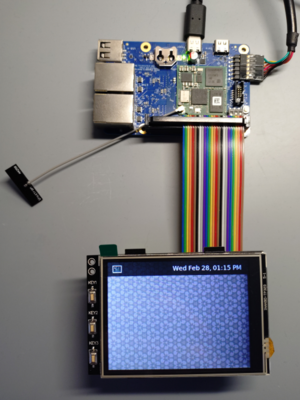
- Add Device Tree oeverlay to u-boot.

=> setenv loaddtos '#conf-stm32mp135f-dhcor-dhsbc.dtb#conf-stm32mp13xx-dhcor-dhsbc-overlay-rb-tft32-v2.dtbo' => saveenv => saveenv
Year 2038 problem with 32-bit systems
- How can the problem be solved?
- - Linux kernel - disable COMPAT_32BIT_TIME and fix whatever broken userspace you might still have. This disables backward compatibility syscalls which use 32bit time_t and which will surely break in 2038.
- - Userspace/OE - Keep an eye on OE QA failures flagged with "32bit-time" which indicate use of 32 bit time_t . Fix your recipes and upstream the changes.
- - Filesystems - Avoid ext2 and ext3, they are always affected by Y2038. Avoid ext4 with small inode size, less than 256 Bytes inodes are affected. Use ext4 with inodes larger than 256 Bytes.
- - Testing - See OE-core meta/conf/distro/include/time64.inc as a good starting point for simulating Y2038 in QEMU. Test real HW as well, set time past 2038 and especially test updates, see if TLS certificates survive or there is a roll-over of some sort, which would break update-ability in field after 2038. Note that wrong system time, set in far past, can also make the SSL library reject certificates.
